MEDIA

How to Document a Workflow Before You Automate It
Before automating a workflow, document what starts it, who or what performs each step, which information is used, where decisions change the path, what exceptions occur, and how the business knows the work is complete. Add the owner, current measurements, authority limits, and fallback. One clear page plus an exception list is often enough to begin.
The purpose is not to preserve every historical habit. It is to expose the actual process so the team can decide what should be standardized, automated, changed, or left human-led.
The minimum workflow map
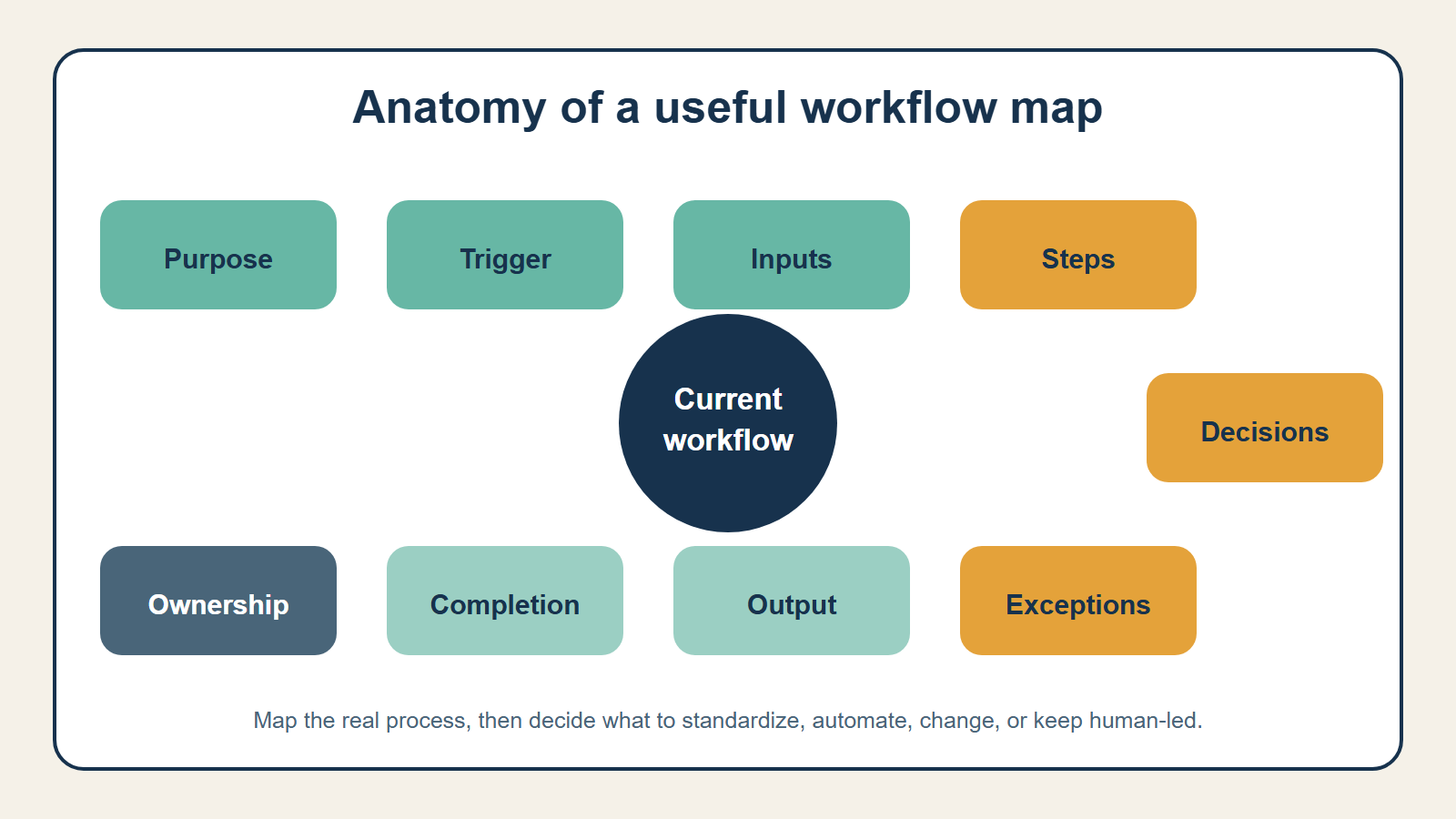
Capture nine elements:
- Purpose: the business outcome the workflow supports.
- Trigger: the event that starts a case.
- Inputs: the records, messages, documents, or facts required.
- Steps: the normal sequence of work.
- Decisions: the questions that change the path.
- Exceptions: cases that cannot follow the normal path.
- Output: the record, communication, action, or decision produced.
- Completion: the condition that closes the case.
- Ownership: the role responsible for policy, operation, and changes.
NIST’s AI Risk Management Framework emphasizes documenting intended purpose, context of use, users, impacts, limitations, human roles, and targeted scope. A workflow map gives a small business the operating context needed before deciding whether AI belongs in the process at all.
Start with one real case
Choose a recently completed, ordinary case and follow it from arrival to closure. Ask the employee to show the work rather than describe the ideal policy from memory. Record each system opened, field checked, message sent, handoff made, and decision taken.
Then compare two or three more cases. Variation appears quickly: one person checks the CRM first, another searches email; a required field is frequently missing; a manager’s approval occurs only for certain customers; or completion depends on an undocumented spreadsheet.
Do not treat every variation as a rule. Mark it for clarification.
Write the trigger precisely
“When a lead comes in” is vague. A useful trigger identifies the event and its source:
A new web inquiry with a valid timestamp is created in the CRM.
The precision matters. Does an email, phone call, duplicate form, reopened opportunity, or imported list start the same workflow? Can one event start two cases? What happens if the system sends the trigger twice?
These questions uncover duplicate actions and missing boundaries before technology amplifies them.
Map the normal path before the exceptions
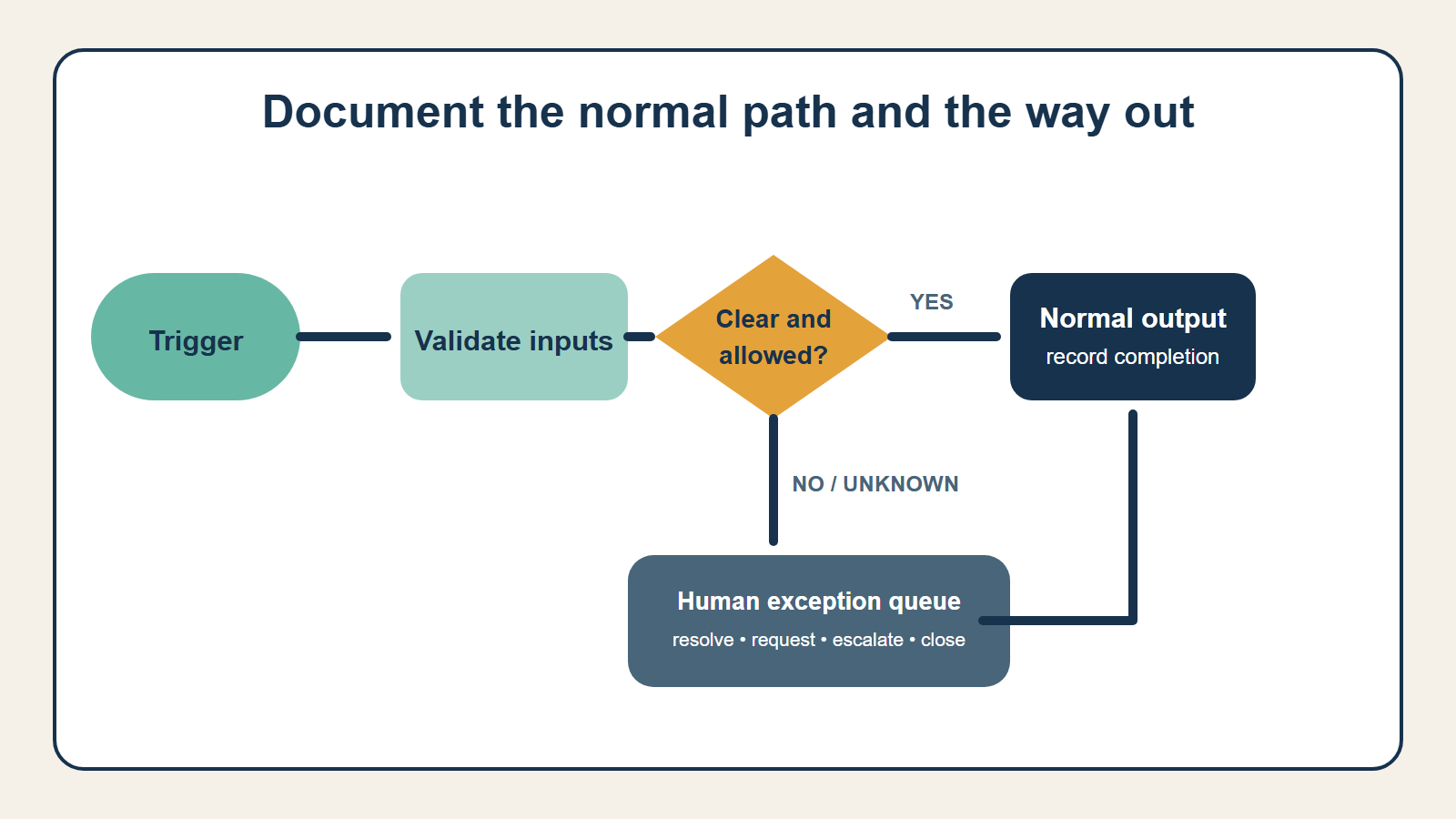
Write the path followed by most cases. Use short verb-object steps:
- validate required contact fields;
- identify requested service;
- check account and territory;
- assign an owner;
- send the approved acknowledgment;
- create a follow-up task; and
- record routing completion.
Number the steps and name the responsible role and system. Avoid combining multiple decisions into a box labeled “process request.” If a step cannot be explained, it cannot be tested reliably.
Turn hidden judgment into decision questions
Employees often say they “just know” what to do. Ask what evidence changes their action. Convert the explanation into a question with defined outcomes:
| Hidden judgment | Documented decision |
|---|---|
| “This looks urgent.” | Does the request contain an approved priority condition? |
| “It goes to the right rep.” | Which current territory, account, or service rule applies? |
| “We need a manager.” | Does the amount, commitment, or exception exceed the role’s authority? |
| “The customer already contacted us.” | Does an open case with the same identity and issue exist? |
Not every judgment should become a fixed rule. The exercise identifies where interpretation is required and where the workflow should route to a person.
Build an exception inventory
Ask employees what makes a case take longer, require help, or come back for correction. Review recent failures and rework, not just memorable disasters.
For each exception, record:
- how it is detected;
- estimated frequency;
- consequence if missed;
- current owner;
- information needed to resolve it;
- allowed action or escalation; and
- evidence that the case was closed.
Group similar exceptions. A first automation does not need to handle all of them; it needs a dependable path to stop or hand them off. See What Is an Exception Queue—and Why Does Automation Need One? for the operating design.
Identify authoritative information
List every fact used in a decision and name its source. If price appears in a proposal template, a spreadsheet, and an accounting system, which one controls? If a policy document conflicts with a manager’s email, what should the workflow do?
Record required fields, maximum acceptable age, access restrictions, and the missing-data response. Why Clean Business Data Matters Before You Add AI explains the task-fit quality check.
Define authority boundaries
Separate what the workflow may prepare, recommend, approve, send, change, or spend. Specify thresholds for external communication, sensitive information, financial commitments, account changes, and policy exceptions.
Mark the required human control: review, approval, exception handling, or takeover. Link the map to the named policy rather than copying changing policy text into every diagram.
Capture the current baseline
Document what happens now so the business can compare the future process. Useful measures include:
- cases per week or month;
- active handling time;
- elapsed cycle time;
- backlog and age;
- rework or correction rate;
- exception frequency;
- missed deadlines; and
- customer repeat contact.
Use a representative period. If volume is seasonal, say so. A workflow diagram without a baseline can show that automation is busy but not whether it improved the business.
Add failure and recovery paths
What happens when a required system is unavailable, an integration times out, a credential expires, or an action succeeds but the confirmation is lost? Define whether the case retries, waits, returns to a person, or follows a manual path.
Record how the team prevents duplicate actions after restart. Identify the owner who can pause and resume the workflow and where pending cases remain visible.
Use a simple workflow record
A practical record can contain:
| Field | What to write |
|---|---|
| Name and version | Clear workflow name, owner, effective date, revision |
| Purpose and scope | Outcome, included cases, excluded cases |
| Trigger and completion | Start event and closure condition |
| Normal path | Numbered steps with role and system |
| Decision table | Question, evidence, allowed outcomes |
| Exception inventory | Detection, owner, resolution, escalation |
| Data and access | Authoritative sources, freshness, permissions |
| Controls | Reviews, approvals, limits, logs, fallback |
| Measures | Baseline and success indicators |
Keep the diagram readable and link to supporting policy or field definitions. Version the record when the process changes.
Mark unresolved questions instead of inventing answers
Mapping often exposes a policy conflict that no employee can settle during the session. Do not let the loudest opinion become an automation rule. Add the question to a decision log with an owner, due date, affected cases, and temporary safe handling.
Examples include two teams claiming ownership, inconsistent refund limits, unclear definitions of completion, or a customer promise that conflicts with the written policy. Route affected cases to a person until the business resolves the question.
This pause is productive. Automation should encode an approved operating decision, not conceal disagreement behind a consistent interface. The unresolved-question log also distinguishes work that is ready for technology from work that needs management attention first.
Validate it with the people doing the work
Walk through representative cases using the document. Ask a second employee to follow it. Include incomplete, duplicate, urgent, and failed cases. Correct the map when reality differs; do not force reality to match the first diagram.
The NIST AI RMF Playbook recommends operational documentation for people who use and oversee deployed systems, including known risks and mitigation criteria. Validation makes the workflow record usable operating documentation instead of a design artifact that expires after the meeting.
Set a change checkpoint
Name the events that require the map to be reviewed: a policy revision, new system, changed authority limit, recurring exception, incident, vendor update, or material shift in volume. The workflow owner should approve changes before the automation adopts them.
Keep the previous version and effective date. Notify affected operators and test representative cases again. This small checkpoint prevents the diagram, automation, and real process from drifting into three different versions of the truth. Documentation remains useful when it is treated as an operating record with an owner—not a picture created once for the implementation team.
Continue with How to Choose Your First Business Process to Automate and How to Design an AI Workflow That Fails Safely, or return to the AI Operations & Command Centers hub.
Readers building a coordinated operating system can explore The AI Agent Entrepreneur, Volume I. The book’s implementation sequence and working materials go beyond this public mapping method and are not reproduced here.
Ask a second operator to follow the documented workflow without coaching. Their questions reveal missing decisions, hidden context, and ambiguous finish conditions that the usual operator may no longer notice.