MEDIA
The AI Command Center: What It Is and Why Every Small Business Needs One
An AI command center is the management layer that shows a business owner what automated and agent-assisted work is doing, where it needs attention, whether it is producing the intended outcome, and when its authority should be changed or stopped. It combines a concise dashboard, exception queues, decision rights, evidence, alerts, and a recurring operating cadence.
It is not a wall of impressive charts. It is a place for making decisions. A useful command center helps the business answer, quickly: What is running? What completed? What failed or stalled? What requires a person? What changed? What did it cost? Did the customer or business outcome improve? Is anything outside our tolerance?

Why ordinary management visibility breaks down
Manual work is often visible through conversations, inboxes, meetings, and direct supervision. Automation moves activity into connectors, scheduled jobs, vendor platforms, model calls, and background queues. Work can fail without making noise, succeed technically without producing the desired outcome, or create a growing review backlog that nobody owns.
AI adds another complication: the same instruction can produce varied outputs, and an agent may choose among tools or steps. Microsoft’s observability guidance notes that probabilistic AI systems need more than conventional uptime telemetry. Teams also need visibility into quality, safety, model behavior, tool use, and governance.
Without a command center, owners usually discover problems through a complaint, a surprising invoice, an employee’s workaround, or a pile of unresolved exceptions. The system may be “up” while the business is losing time, trust, or money.
A command center is a management system, not a dashboard
A dashboard displays information. A command center connects information to ownership and action. It has five parts:
- A portfolio view of every active workflow, its owner, purpose, authority, and current health.
- Outcome and reliability measures that compare current performance with a baseline and target.
- Actionable queues for approvals, exceptions, incidents, changes, and overdue work.
- Evidence and drill-down that reconstructs a run from input to final outcome.
- A decision cadence that turns signals into documented changes, follow-up, and learning.
Google’s site-reliability guidance makes a useful distinction: a dashboard summarizes core measures, while an alert interrupts a person because something is broken or likely to break. A small-business command center should preserve that distinction. If everything produces an urgent notification, the team will learn to ignore the system.

Start with the portfolio register
Create one record for each AI-assisted or automated workflow. Include:
- business purpose and intended user or customer;
- accountable business and operational owners;
- trigger, frequency, and expected volume;
- systems, data sources, models, and vendors involved;
- information and action permissions;
- required human review or approval;
- target measures and current baseline;
- last material change and next review date;
- manual continuity and emergency-stop method; and
- status: proposed, pilot, active, restricted, paused, or retired.
This register prevents “shadow AI” from becoming an invisible operating dependency. It also helps the owner find duplicated tools, abandoned pilots, excessive access, and workflows that no longer have a responsible person.
Do not confuse an inventory with control. The record becomes useful when it is reviewed and connected to decisions.
Show outcomes before technical activity
The top of the command center should answer whether the business is getting the intended result. Depending on the workflow, that may include:
- verified cases completed;
- qualified response time;
- first-pass acceptance or rework rate;
- customer resolution or satisfaction;
- revenue protected or generated;
- cost per completed outcome;
- hours of constrained human capacity released; or
- risk events prevented or detected.
Below those, show operating signals: volume, latency, failure rate, retries, queue age, model or vendor cost, corrections, overrides, and escalation rate. Technical measures explain performance; they should not replace the business result.
A workflow that generates 10,000 outputs is not necessarily productive. A workflow that completes 900 verified cases at lower total cost and equal or better quality may be.
Make exceptions impossible to hide
Every item that cannot complete normally should enter a visible state with a reason, owner, age, deadline, and safe default. Common queues include:
- incomplete or invalid input;
- ambiguous interpretation;
- policy or permission failure;
- required approval;
- external system failure;
- suspected duplicate;
- outcome verification failure;
- customer appeal or correction; and
- security, privacy, or safety incident.
The command center should display queue volume and the age of the oldest item. A small queue can still be dangerous if one consequential case has waited too long. Route work by role, not by hoping somebody notices an email.
Exception trends are improvement data. If the same condition appears repeatedly, repair the upstream process, data, rule, or training rather than expanding the review team indefinitely.
Separate dashboard signals from alerts
Use three response levels:
| Level | Meaning | Response |
|---|---|---|
| Observe | Normal variation or a nonurgent issue | Review on the dashboard during the next cadence |
| Act | A threshold or service commitment is at risk | Create an owned ticket with a deadline |
| Interrupt | Material harm is occurring or imminent | Alert the on-call owner and pause or contain where defined |
Good alerts are specific, actionable, and rare enough to deserve attention. They identify the affected workflow, business impact, current state, threshold crossed, evidence link, safe action, and responsible owner.
Avoid alerts for conditions with a fixed, deterministic response. Implement that response in code, then record what happened. Human interruption is for judgment, coordination, or authority that software cannot safely exercise.
Preserve run-level evidence
When a number changes, the owner needs to know why. A command center should allow a reviewer to trace a representative or problematic run through:
- correlation and idempotency identifiers;
- request time, source, and responsible identity;
- relevant source references and data freshness;
- workflow, prompt, model, policy, and connector versions;
- validation results and confidence or ambiguity signals;
- tool calls and authoritative system responses;
- approvals, overrides, retries, and state transitions;
- final verified outcome; and
- customer correction, incident, or recovery action.
Do not copy unnecessary sensitive material into the dashboard. Link to governed evidence with appropriate access and retention. The command center should improve accountability without becoming a new uncontrolled data warehouse.
Monitor quality, not just availability
Conventional monitoring asks whether the service responds, how long it takes, and how often it errors. AI-assisted work also needs evaluation of whether outputs remain useful and appropriate.
Quality monitoring can include:
- sampling against a human-reviewed rubric;
- expected results for a stable regression set;
- factual support or source-grounding checks;
- correction and override rates;
- disagreement between reviewers;
- performance by case type or affected group;
- drift in inputs, outputs, or escalation reasons; and
- feedback from customers and frontline employees.
Use deterministic validation wherever possible. Model-based evaluation can help with identified judgment tasks, but it should not be the only judge of the same system. Preserve human review for high-consequence, novel, or ambiguous cases.
Give the command center real controls
Observation without authority produces frustration. Define who can:
- acknowledge and assign an incident;
- approve or reject a queued action;
- reduce transaction, recipient, or volume limits;
- switch a workflow to draft-only or read-only mode;
- pause a connector, model-assisted step, or entire workflow;
- activate the manual continuity process;
- roll back a configuration; and
- authorize return to service.
NIST’s AI Risk Management Framework specifically calls for post-deployment monitoring, appeal and override, incident response, recovery, change management, bypass or deactivation thresholds, and safe decommissioning. A small business can implement these proportionally with clear buttons, permissions, checklists, and owners.
The person who can pause a system should not need to find the original developer during an incident. Test the control before production.
Use three operating cadences
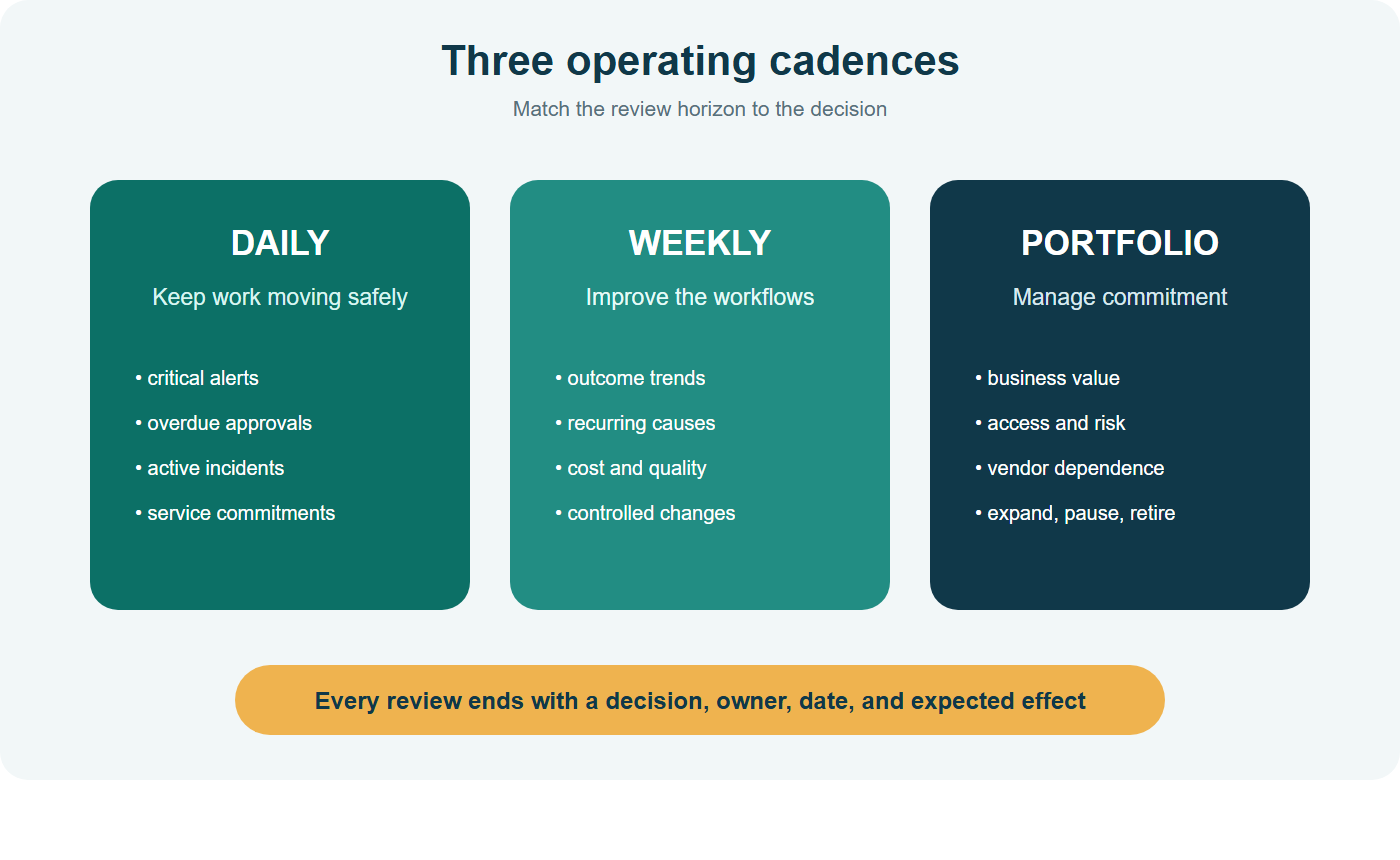
Daily: keep work moving safely
Review critical alerts, overdue approvals, high-consequence exceptions, failed integrations, and service commitments. Confirm that every active incident has an owner and next update time. This can take ten minutes when the queues are designed well.
Weekly: improve the workflows
Review outcome trends, queue age, correction and override rates, cost, reliability, recurring causes, and recent changes. Select a small number of improvements, assign owners, and document the expected effect. Avoid changing prompts, data, rules, and models at once; controlled changes are easier to evaluate.
Monthly or quarterly: manage the portfolio
Revisit business value, vendor concentration, access, risk tolerance, maintenance burden, and whether each workflow should expand, remain constrained, pause, or retire. Review incident themes and the health of the people operating the system, not just the technology.
What the owner should see on one screen
A practical owner view can fit into six panels:
- Outcome: current result versus baseline and target.
- Flow: received, completed, failed, waiting, and oldest item.
- Human attention: approvals, exceptions, appeals, and overdue work.
- Reliability and quality: verified success, corrections, drift, incidents, and recent changes.
- Economics: usage, all-in cost, cost per outcome, and capacity effect.
- Authority and risk: active permissions, threshold status, paused workflows, and upcoming reviews.
Each panel should lead to the responsible queue or evidence, not another decorative chart. Use consistent definitions and timestamps. If two systems calculate “success” differently, the command center will create debate instead of clarity.
Connect measures to decisions
Every prominent measure should have a reason to exist. Document its owner, source, calculation, expected range, review frequency, and the decision it can influence. For example:
- rising queue age can trigger capacity reallocation or narrower intake;
- a higher correction rate can pause a recent model or prompt change;
- cost per verified outcome can lead to routing simpler cases through deterministic automation;
- repeated permission failures can reveal an incorrect workflow design rather than a need for broader access;
- a surge in customer appeals can reduce authority and initiate a case review; and
- declining completion volume with stable demand can expose a connector or upstream data problem.
Use comparisons that create context: today versus a recent baseline, actual versus target, and one case type versus another. Show denominators. “Ten failures” means something different across twenty runs and twenty thousand.
Avoid composite health scores that hide the underlying tradeoff. A single green number can average together excellent speed and unacceptable quality. Show the few component measures the owner needs to balance, and let the review record explain the decision. When a measure no longer informs action, remove or demote it.
Build the first version without overengineering
Start with one consequential workflow and the systems you already own. A spreadsheet, database view, help-desk queue, and a simple reporting tool may be enough for the first version. The management design matters more than the dashboard product.
Build in this order:
- define the outcome, owner, states, and safe defaults;
- create structured event and outcome records;
- establish exception and approval queues;
- calculate a small set of trusted measures;
- define alert thresholds and response owners;
- link measures to run-level evidence;
- schedule daily, weekly, and portfolio reviews; and
- test pause, recovery, and manual continuity.
Do not ask a model to perform fixed status checks, scheduled polling, threshold comparisons, or alerts. Those operations should execute deterministically. Use models only when the command center needs interpretation—such as summarizing a novel incident or clustering free-text exception themes—and keep the underlying evidence available.
Common command-center failures
Too many metrics. A crowded dashboard hides decisions. Start with measures tied to outcome, flow, human attention, quality, cost, and risk.
No shared definitions. Document what counts as received, completed, failed, corrected, and verified.
Alerts without owners. Every interruption needs a role, deadline, escalation path, and safe default.
Only technical health. Uptime can be green while customer outcomes decline.
No evidence drill-down. Aggregates cannot resolve a disputed or surprising case.
Review without action. Record decisions, owners, dates, and expected effects.
Permanent pilots. Set criteria to commission, restrict, pause, or retire each workflow.
A command-center readiness checklist
Before relying on the view, confirm:
- every workflow has a purpose, owner, status, and authority profile;
- business outcomes and operational measures have stable definitions;
- exception and approval states are explicit;
- alerts correspond to material, actionable conditions;
- evidence can reconstruct a run;
- reviewers can reach authoritative source records;
- pause, recovery, and continuity controls work;
- access to the command center is appropriately scoped;
- changes are versioned and visible;
- daily, weekly, and portfolio decisions have owners; and
- the command center itself has an operator and maintenance plan.
The command center becomes valuable when it reduces surprise and improves decisions. Its purpose is not to prove that AI is working. Its purpose is to show what is true, focus human attention, and give the business a disciplined way to adjust.
Begin small, but design for honesty. If a measure is not yet trustworthy, label it as provisional. If an outcome cannot be verified automatically, assign a sampling process. If the team cannot respond to an alert, narrow the alert or the workflow. Visibility should expose operating limits rather than create a polished fiction of control.
For the metrics layer, continue with The First 10 Metrics for an AI-Operated Business Command Center. To design the stopping and recovery paths behind the controls, see How to Design an AI Workflow That Fails Safely.
Turn the dashboard into a recurring management habit with What a Weekly AI Operating Report Should Include. When a metric points to an unexpected result, use How to Investigate an AI Mistake Without Blaming the Model to trace the full workflow. Browse the complete AI Operations & Command Centers hub for the surrounding operating system.
Sources and further reading
- NIST AI RMF: Manage
- NIST AI Risk Management Framework Core
- Google SRE: Monitoring Distributed Systems
- Microsoft Learn: Observability for generative AI and agentic systems
- Microsoft Foundry: Agent tracing overview
Build the management layer behind your agents
Agentrepreneur: Building Your AI Agent Business in 28 Days goes deeper into the operating discipline for an agent-enabled company. This article defines the management problem and public design principles; the book helps owners build the broader system without confusing a dashboard with accountability.