 MEDIA

How to Calculate the ROI of AI Automation
To calculate the ROI of AI automation, estimate the annual value of improvements the business can actually capture, subtract the complete annual cost of owning and operating the workflow, and divide the net benefit by that cost. Use a measured baseline, discount uncertain benefits, and show the assumptions instead of presenting one optimistic percentage.
The basic equation is:
ROI = (captured annual benefit − annualized total cost) ÷ annualized total cost × 100%
That formula is simple. The hard work is defining “captured benefit” and “total cost” honestly. Labor minutes do not automatically become cash savings, an error avoided is not always worth the invoice amount, and a software subscription is only one part of the cost.

Start with a baseline, not a vendor promise
Measure the current workflow before changing it. Choose a representative period and record:
- cases processed and completed;
- hands-on labor time and elapsed cycle time;
- backlog size and age;
- error, correction, and repeat-contact rates;
- missed deadlines or abandoned requests;
- direct fees, refunds, or write-offs tied to the process; and
- revenue or customer outcomes only when the connection is credible.
Separate labor time from waiting time. A request may require eight minutes of employee effort yet sit for two days between handoffs. Automation could improve response time without eliminating eight minutes of payroll, or it could reduce effort without changing customer-visible speed. Those are different benefits.
NIST’s AI Risk Management Framework recommends context-specific metrics, comparison with benchmarks, documented limitations, and continued measurement after deployment. ROI should use the same discipline: define what the system is expected to improve and how the business will detect whether it actually did.
Count five benefit categories
1. Capturable labor capacity
Estimate the minutes avoided per case, multiply by expected volume, then multiply by the fully loaded hourly cost of the people doing the work. Fully loaded cost can include wages, employer-paid benefits, payroll taxes, and other role-specific employment costs. The Bureau of Labor Statistics tracks wages and benefit costs separately, which is a useful reminder that a wage rate alone is not total compensation.
Then apply a capture factor. If automation frees 400 hours but the team cannot reduce overtime, avoid a hire, accept more work, or reassign those hours to valuable activity, the financial value is not the same as 400 hours of cash savings.
Captured capacity value = hours avoided × loaded hourly cost × capture factor
A capture factor might be 100% when the change eliminates paid overtime, 60% when time is deliberately reassigned to a constrained revenue activity, or near zero when small fragments simply disappear across the week. The percentage is an assumption; document why it is reasonable.
Treat time as capacity before treating it as cash
Owners often hear that an automation will “save one full-time employee.” That conclusion rarely follows from a collection of small time estimates. Thirty minutes released across six roles may be useful, but it is not automatically a removable position. Work is scheduled in shifts, arrives unevenly, and contains responsibilities the automation does not touch.
Create a capacity plan beside the ROI calculation. Name the work that will absorb the released time, the manager responsible for the reassignment, and the outcome expected from it. Examples include clearing an existing backlog, extending service hours, increasing quality review, following up with more qualified leads, or avoiding a planned contractor expense. If there is no plan, classify the benefit as employee convenience or resilience rather than booked financial value. Those outcomes can still justify a project, but they should not masquerade as cash.
2. Error and rework reduction
Count the expected change in errors, not the total value of transactions touched. Include correction labor, duplicate processing, refunds, service credits, shipping, chargebacks, or other costs the business historically incurs because of the error.
Do not assume every detected error would have caused the worst outcome. Use observed frequency and average consequence where possible:
Error-reduction value = cases × baseline error rate × expected reduction × average avoidable cost
3. Cycle-time and service improvement
Faster response can reduce abandonment, accelerate cash collection, shorten fulfillment, or improve customer retention. These benefits matter, but they are easy to overstate. Connect the improvement to evidence: a measured change in conversion, days-to-payment, repeat contacts, or retention.
If evidence is not yet available, show cycle-time improvement as an operating metric rather than forcing it into dollars. A dashboard can report “median response fell from four hours to 20 minutes” while the financial case remains conservative.
4. Additional capacity or revenue contribution
Automation may let the existing team handle more inquiries, orders, or reports. Value the additional completed work at contribution margin—not gross revenue—then discount it for demand and conversion uncertainty.
Capacity value = additional completed units × contribution margin per unit × confidence factor
Do not count new revenue unless the workflow removes a real bottleneck and the business has demand to fill the capacity. “We could process twice as many leads” is not a benefit if lead volume does not increase or sales cannot follow up.
5. Risk reduction and avoided loss
Controls may reduce missed deadlines, unauthorized actions, privacy incidents, or lost evidence. Expected-loss analysis can help:
Expected risk reduction = change in annual probability × estimated consequence
Use ranges because rare events are uncertain. Keep risk reduction separate from recurring operating savings so decision-makers can see what drives the result. For legal, insurance, tax, privacy, or safety consequences, consult qualified advisers rather than inventing a precise number.
Keep nonfinancial benefits visible
Some improvements are strategically important before they are reliably monetized. Better documentation, faster access to evidence, more consistent customer communication, reduced employee frustration, and the ability to operate during a short staff absence can matter. List them in a separate scorecard with a proposed measurement method.
For example, track the percentage of completed cases with an auditable record, employee-reported effort, or the number of requests that remain serviceable during a planned absence. Separating these benefits protects the financial model from inflated estimates without pretending that only immediate cash matters.
Include the full cost of ownership
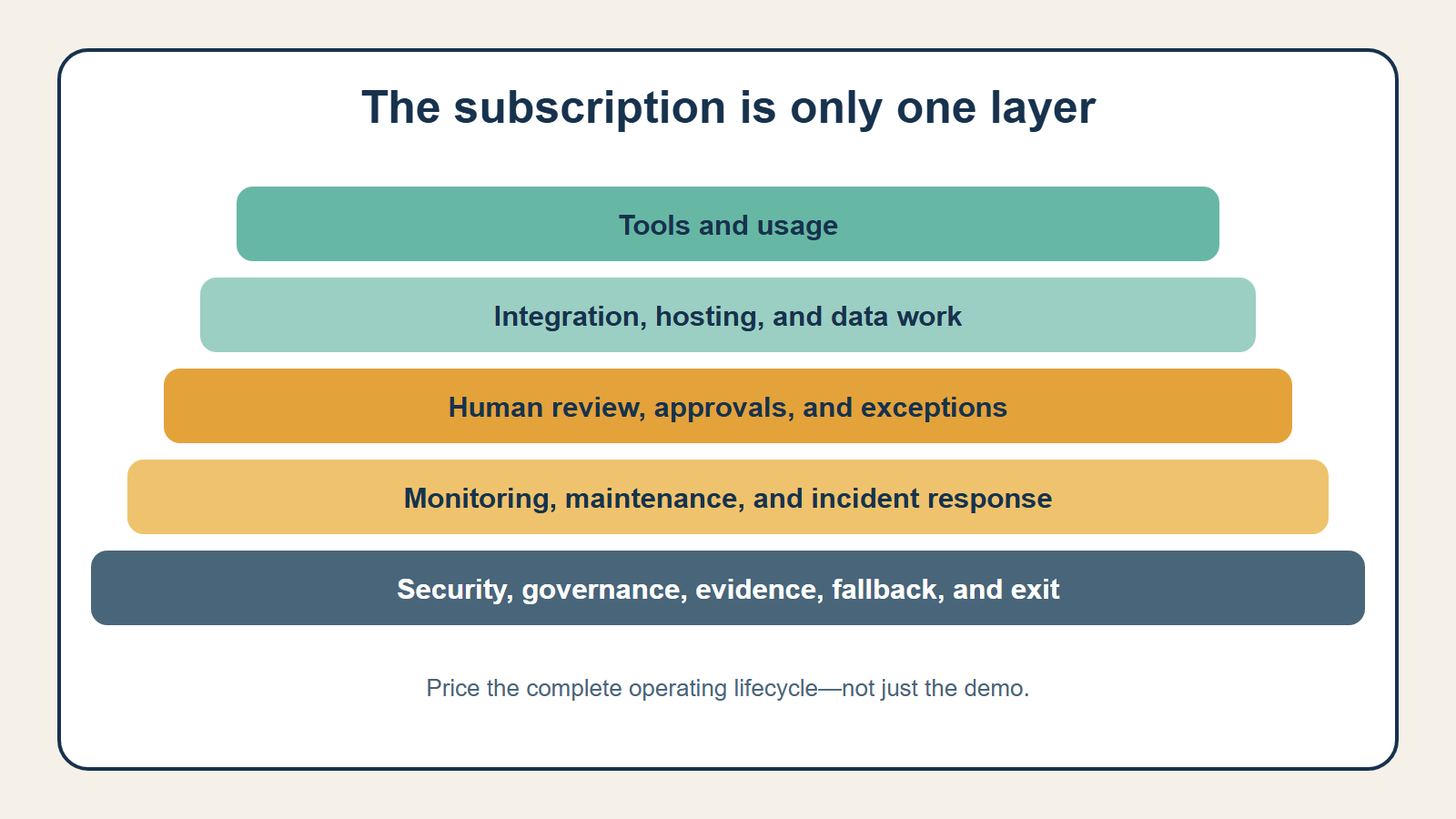
Build the cost side from the complete operating lifecycle.
One-time costs
- process discovery and baseline measurement;
- software evaluation and procurement;
- configuration, development, and integrations;
- data cleanup or migration;
- testing, security review, and documentation;
- employee training and change management; and
- parallel operation or temporary productivity loss during launch.
Recurring costs
- subscriptions and usage-based model or API fees;
- integration, hosting, storage, and observability services;
- human review, approvals, and exception handling;
- monitoring, incident response, and quality sampling;
- credential, vendor, prompt, rule, and workflow maintenance;
- security, privacy, compliance, and audit work; and
- contingency for growth, retries, price changes, or redesign.
The U.S. Small Business Administration’s software-selection checklist warns that complexity, configuration, consulting, and custom integrations can add cost. It also recommends considering integration, upgrade paths, trials, and low-risk terms. A low monthly price does not make a workflow inexpensive if the business must continually reconcile data or repair a brittle custom connection.
Annualize one-time costs across a reasonable planning horizon rather than pretending they vanish after launch. For a three-year evaluation, a $15,000 implementation contributes $5,000 per year before financing or time-value adjustments. Keep the original cash outlay visible as well, because a project with attractive annualized ROI can still strain cash flow.
Price the human control layer
“Human in the loop” is a cost-bearing operating design, not a free safety label. Estimate how many cases receive review, how long review takes, what happens during peak volume, and who covers absences. Add time for quality sampling even when most cases flow automatically. If a manager must approve every external action, that approval queue may become the new bottleneck.
Price exception handling separately from routine review. The average uncertain case often takes longer because the reviewer must reconstruct context, correct data, contact a customer, or reverse a partial action. A pilot should measure exception arrival rate and average resolution time; those two numbers can change the ROI more than the model subscription.
Include the cost of a safe exit
An automation may need to be paused because a vendor changes, credentials expire, inputs drift, performance declines, or the underlying process changes. Budget for export, documentation, rollback, and a temporary manual fallback. These costs are easy to ignore because they do not occur every month, yet they determine whether the business can respond without losing records or interrupting service.
A worked example: inquiry routing
The following numbers are hypothetical and illustrate the method; they are not industry benchmarks.
A service business receives 1,500 inquiries per month. Employees spend an average of four minutes reading, categorizing, and assigning each one. A proposed workflow classifies the inquiry, checks required fields, routes routine cases, and sends uncertain cases to a person.
Baseline and benefit assumptions
| Input | Illustrative assumption |
|---|---|
| Annual inquiries | 18,000 |
| Minutes avoided per inquiry | 2.5 |
| Gross hours avoided | 750 |
| Loaded labor cost | $38/hour |
| Capture factor | 60% |
| Captured capacity value | $17,100 |
| Annual rework avoided | $4,800 |
| Conservative service value | $3,000 |
| Total captured benefit | $24,900 |
The company does not value all 750 hours at 100%. It expects to redirect about 60% toward a documented backlog and peak-season coverage. Service value is capped at $3,000 until the business can connect faster routing to conversion or retention data.
Cost assumptions
| Cost | Year-one amount |
|---|---|
| Software and usage | $4,800 |
| Integration and hosting | $2,400 |
| Human review and exception handling | $3,600 |
| Monitoring and maintenance | $2,400 |
| Training and process documentation | $1,200 |
| Initial design, build, and testing | $7,500 |
| Year-one total cost | $21,900 |
Year-one net benefit is $3,000, so year-one ROI is about 13.7%. If the initial build does not repeat in year two and other assumptions hold, the economics improve—but only if monitoring, review, and maintenance continue to be funded.

This is why a single multi-year percentage can mislead. Show year-one cash impact, steady-state operating economics, and the payback period separately.
Add payback period and net benefit
ROI is easier to interpret with two companion measures:
- Annual net benefit: captured benefit minus annual cost.
- Payback period: initial investment divided by expected monthly net operating benefit.
For larger investments, a finance professional may also use net present value or internal rate of return. Those methods account for timing, but they do not rescue weak inputs. A precise discount rate applied to speculative benefits still produces a speculative answer.
Run three scenarios
Create conservative, expected, and upside cases. Change the assumptions most likely to move:
- eligible volume and adoption;
- minutes actually avoided;
- exception and correction rates;
- human-review time;
- usage-based fees;
- capture factor;
- implementation delay; and
- maintenance effort.
The conservative case should be plausible, not theatrical. Ask what happens if volume is 20% lower, review takes twice as long, or only half the projected time can be captured. If the project works only in the upside case, treat it as an experiment rather than a committed return.
Build a one-page ROI worksheet
A useful decision sheet can be concise. Give every input an owner and a source:
| Worksheet section | Questions to answer |
|---|---|
| Scope | What exact trigger, cases, actions, users, and systems are included? |
| Baseline | What period, volume, effort, delays, errors, and costs were measured? |
| Benefits | Which benefits are cash, capturable capacity, operating metrics, risk reduction, or nonfinancial? |
| Costs | What is paid once, paid per month, usage-based, or supplied through employee time? |
| Controls | What review, approval, monitoring, evidence, fallback, and recovery work is required? |
| Scenarios | Which assumptions define the conservative, expected, and upside cases? |
| Decision | What threshold causes the business to continue, narrow, redesign, or stop? |
Attach evidence rather than relying on memory: time samples, invoice data, system reports, error logs, staffing plans, vendor quotes, and pilot results. Record who approved each assumption and when it should be revisited. The goal is not a complicated spreadsheet; it is a traceable decision that can be updated when reality changes.
Avoid double counting
The same improvement can appear in several categories. If reduced handling time creates capacity for more sales, do not count both the full labor value and the full contribution margin unless the business truly captures both. If fewer errors reduce refunds, do not also value the entire transaction as “revenue saved.”
Keep a benefit ledger with four fields: metric, baseline, causal explanation, and financial treatment. Each dollar should appear once.
Measure after launch—and allow a stop decision
Define the review cadence before implementation. Compare actual volume, automated completion, human intervention, errors, latency, and cost with the baseline. Include downstream effects: a fast upstream system can simply move work into another queue.
NIST recommends testing before deployment and regularly during operation, using repeatable measurement and documented results. The same evidence should support a continue, redesign, narrow, or stop decision. A workflow that produces activity but does not improve the business is not successful automation.
Start with What Makes a Business Task a Good Automation Candidate? and How to Choose Your First Business Process to Automate. For the ongoing ownership costs, read The Hidden Maintenance Work Behind Reliable Automation, or return to the Growth, Teams & Economics hub.
Readers who want the coordinated operating system can explore The AI Agent Entrepreneur, Volume I. The book’s guided implementation sequence and working materials go beyond this public financial model and are not reproduced here.


