MEDIA

What Information Should an AI Agent Be Allowed to See?
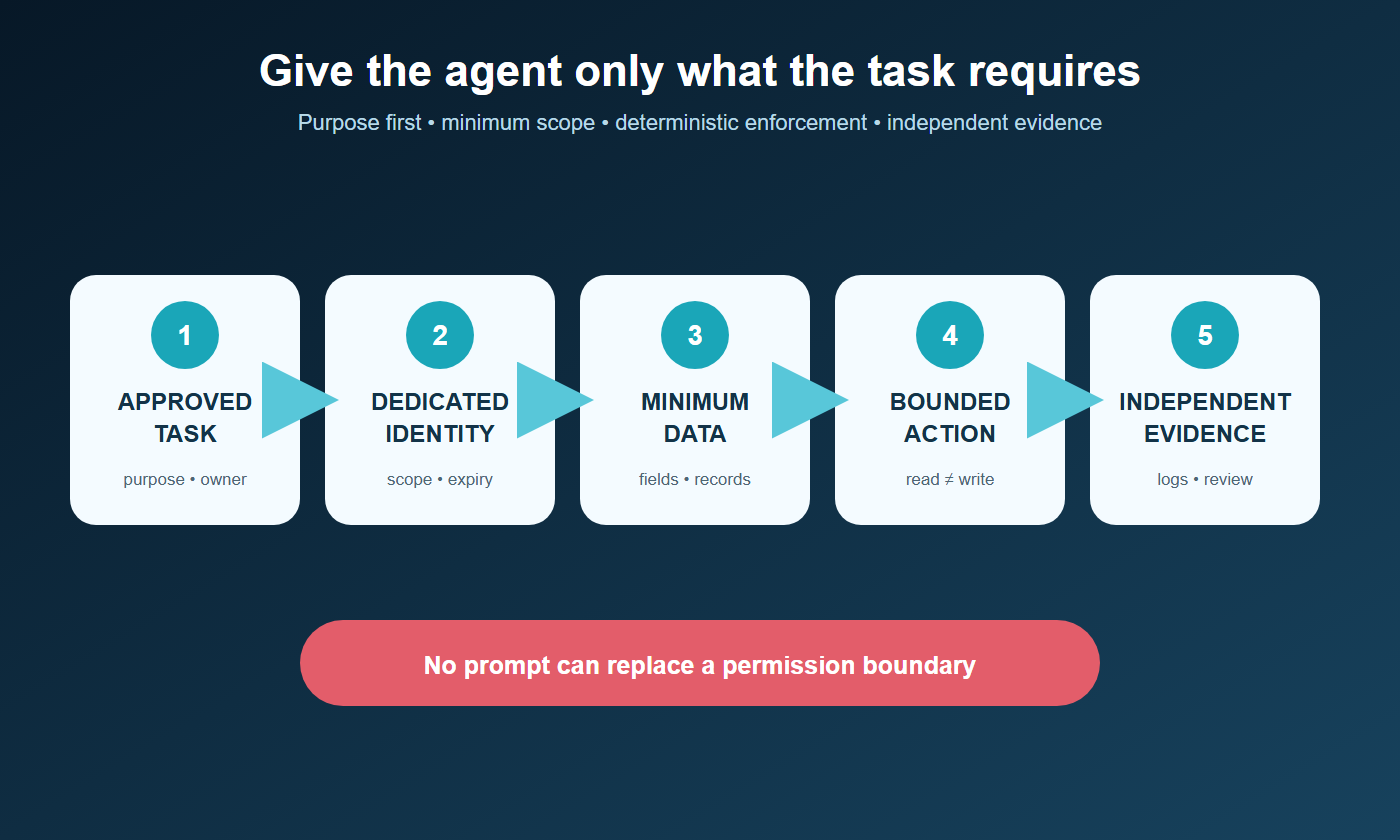
An AI agent should see only the information required for its approved task, for the period it is needed, and under permissions that can be enforced, logged, reviewed, and revoked. Do not give an agent the full access of the employee who configured it merely because that is convenient.
This is the principle of least privilege applied to agents: restrict users or processes to the minimum resources and authorizations needed for assigned work. For a small business, the practical goal is not a complex security program. It is to replace broad, inherited access with a clear map of purpose, data, actions, identity, and limits.
Begin with the approved task
“Help with customer service” is too broad. “Draft a reply to an authenticated customer using that customer’s current order, approved product documentation, and the company’s return policy” is narrow enough to design access.
For each workflow, document:
- the business outcome and users;
- the data fields and records required;
- the systems the agent must read or change;
- the actions it may propose or execute;
- the conditions requiring human approval;
- the retention and logging requirements; and
- the owner who can change or revoke access.
If the task cannot be defined, access cannot be minimized reliably. Return to How to Document a Workflow Before You Automate It before connecting systems.
Classify the information before granting access
Use categories the business can apply consistently.
Public information
Published product pages, public policies, approved marketing materials, and public research usually present the lowest confidentiality risk. They can still be outdated, copyrighted, or unsuitable for a decision, so preserve sources and version dates.
Internal operational information
Procedures, project records, inventory, schedules, internal notes, and ordinary business documents may be appropriate for an agent with a defined job. Limit access by team, workflow, customer, location, or record type rather than exposing the entire internal drive.
Confidential business information
Pricing strategy, contracts, forecasts, proprietary methods, partner terms, unreleased products, and acquisition discussions need tighter purpose, user, export, and retention controls. Consider whether the agent needs the source document or only a selected field or approved summary.
Personal and sensitive information
Customer, employee, applicant, financial, health, credential, identity, and regulated records require particular care. Confirm the business has authority and a necessary purpose before access. Minimize fields, mask values where possible, and separate workflows with different obligations.
Secrets and control data
Passwords, API keys, private keys, recovery codes, administrative tokens, and unrestricted credentials should not be placed in prompts or ordinary knowledge collections. Use a managed secret store and a bounded connector that performs an approved action without revealing the secret to the reasoning layer.
Separate read access from action authority
The ability to read a record does not imply permission to change it. Design separate scopes for:
- search or retrieve;
- view selected fields;
- create a draft;
- create a new record;
- update specified fields;
- send or publish;
- approve or commit;
- delete; and
- administer users, permissions, or integrations.
An agent that drafts an invoice explanation may need read access to one invoice and the payment policy. It does not need authority to change the ledger, issue a refund, alter banking details, or search every customer.
NIST’s current design tenets for agent identity recommend minimum task scope, zero or limited standing privilege, separation of duties, deterministic access decisions, and independent logging. The important operational point is that policy enforcement must sit around the agent. A written prompt saying “do not open payroll” is not an access control if the connected account can open payroll.
Give the agent its own identity
Avoid sharing an employee’s username, browser session, or all-purpose API key. Where platforms allow it, use a dedicated service or agent identity with:
- a unique identifier and credential;
- an accountable business owner;
- permissions scoped to the approved workflow;
- strong authentication and protected credential storage;
- expiration or review dates;
- activity logging independent of the agent; and
- immediate revocation capability.
A distinct identity makes it possible to answer who or what accessed a record, under whose delegation, and with which authority. It also prevents a departed employee or changed role from quietly leaving an agent with inherited access.
Minimize the data passed into context
Access to a system does not mean every retrieved field should enter a prompt. Use deterministic filters to select the minimum record, date range, document section, and attributes needed for the current task.
Examples:
- provide order status and item names, not the customer’s full account history;
- provide an approved policy excerpt, not the entire shared drive;
- provide a masked account suffix, not the complete number;
- provide the current support case, not every customer conversation;
- provide a calculated eligibility flag when the raw sensitive attributes are unnecessary; and
- retrieve documents under the requesting user’s permissions rather than an administrator’s.
The Federal Trade Commission advises businesses to limit vendor access to a need-to-know basis and even consider a separate database containing only the data points the vendor needs.
Use an access decision matrix

| Question | If the answer is unclear |
|---|---|
| Is this information required for the approved task? | Do not provide it |
| Does the business have authority to use it this way? | Escalate for policy or professional review |
| Can a smaller field, record set, or approved summary work? | Minimize before connection |
| Is access limited to the correct user, customer, and time? | Add scope and expiration |
| Can the agent take an action with the information? | Separate read from write authority |
| Are access and downstream actions logged independently? | Add evidence before expanding scope |
| Can access be revoked without breaking unrelated work? | Create a dedicated identity or connector |
| Is there a safe response to unusual or sensitive cases? | Route to an authorized person |
Treat “not sure” as an open risk, not implied permission.
Test access boundaries, not only happy paths
Before launch, attempt to retrieve:
- another customer’s record;
- a record outside the approved date or region;
- hidden, archived, deleted, or restricted documents;
- payroll, finance, legal, or executive folders;
- credentials and administrative settings;
- information available to the operator but not the end user;
- data through an indirect link, search result, or connected tool; and
- records after permission is removed.
Also test malicious or misleading content that asks the agent to ignore restrictions or use another tool. Access decisions should be deterministic and enforced by the surrounding systems, not delegated to probabilistic model judgment.
Review access throughout the lifecycle
Permissions drift when employees change roles, vendors add features, integrations are reauthorized, scopes expand, and temporary exceptions become permanent. Review agent identities, owners, scopes, connected systems, data classes, tokens, logs, and unused permissions on a defined cadence and after material changes.
Revoke access when the workflow is paused or retired. Preserve required evidence while removing active permissions and unnecessary data copies. For retention and portability, see Who Owns the Data Your AI Tools Create?.
A practical default
Default to no standing access. Grant a dedicated identity the minimum read or action scope for one approved workflow, retrieve only the required records at task time, enforce boundaries with code and platform permissions, log activity outside the agent, and require approval for consequential actions.
Expand access only after representative testing shows a business need and the controls work. Convenience is not evidence that a broader scope is safe.
Continue with How to Set Approval Rules for AI-Assisted Work and The Small-Business Guide to AI Risk, or return to the Data, Context & Business Memory hub.
Readers building a coordinated operating system can explore The AI Agent Entrepreneur, Volume I. The book’s implementation materials go beyond this public access-control framework and are not reproduced here.
Review access as a set of claims
For every connected source, record the exact business claim that justifies access: which workflow needs it, which fields are necessary, how fresh they must be, who may request the result, and what action can follow. Then test the claims with ordinary and adversarial cases.
A useful access review asks:
- Can the agent retrieve information the requesting user could not open in the source system?
- Does a broad connector expose fields the workflow never uses?
- Can retrieved content influence an action outside the approved purpose?
- Are cached or indexed copies removed when source permissions change?
- Do logs reveal enough to reconstruct what was accessed and why?
Treat every unnecessary field and permission as removable exposure. The goal is not to give the agent everything it might someday need; it is to provide the smallest reliable information path for the outcome it owns.
Continue with the business data map and the Data, Context & Business Memory hub for the surrounding information design.
Repeat the access test after permission, role, connector, or index changes. A control that worked during setup may not remain aligned as sources and identities evolve.
Sources and further reading
- NIST CSRC Glossary: Least Privilege
- NIST: Back to the Future—Why Agentic AI Needs a Strong Identity Foundation
- NIST: Design Tenets for Agent Identity Management Systems
- Federal Trade Commission: Cybersecurity for Small Business—Vendor Security
- Federal Trade Commission: Protecting Personal Information—A Guide for Business